Mouse Settings
Finding a good mouse sensitivity is important to setting up your game.
Chapters
0:21 Mouse Acceleration
0:36 Sensitivity
0:52 Dpi
Windows settings
1. Open the Windows search bar 
2. Search "Mouse Speed"
3. Open "Change the mouse pointer display or speed"
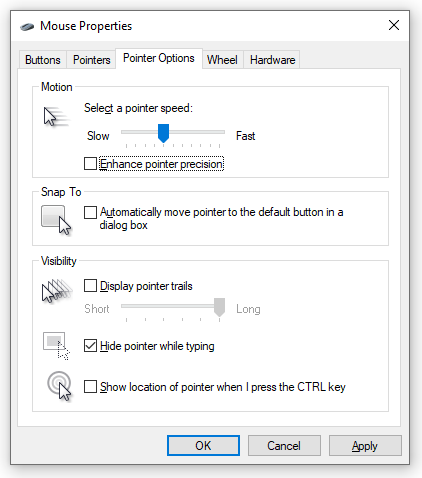
4. Go to the "Pointer Options" tab
5. Uncheck "Enhance pointer precision"
2. Search "Mouse Speed"
3. Open "Change the mouse pointer display or speed"
4. Go to the "Pointer Options" tab
5. Uncheck "Enhance pointer precision"
ONE STEP BETTER
Take this into your next fight.
Try the technique in-game, then come back when you’re ready.
Reading checkpointYour progress saves automatically here.
Progress saves in this browser. Create an account to take your progress with you.